[WHAT YOU WILL GET]
----------------------------------------------------------
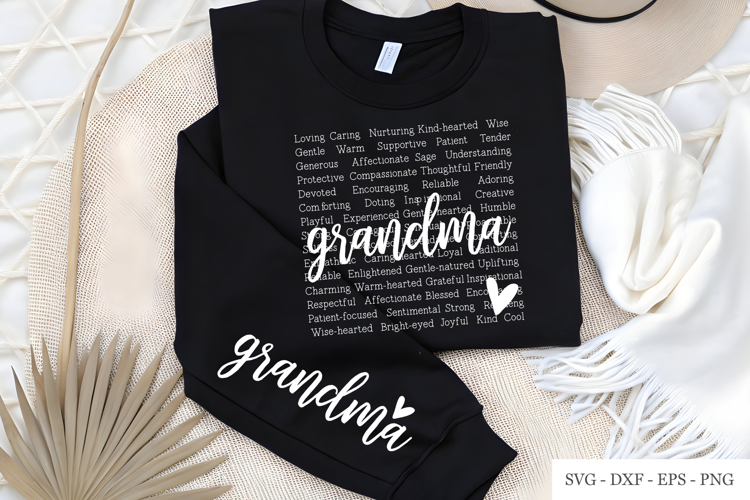
Grandma Subway Art template, Digital Cut file made specially for cutting machines.
This is a fully customizable template. You can change out any word with a grandkids name. You can also change the word Grandma to any title you would like. If your grandkids call you Nanny then just replace Grandma with Nanny. This Template can fit up to 8 grandkids within the gray boxes but if you have more than 8 then you can add them at the bottom.
The font used in a free for commercial use font and I give you the name and where you can find it within the file.
[TEMPLATE DESIGN INSTRUCTIONS]
----------------------------------------------------------
This template design is very easy to use.
I have provided a instruction sheet in the zip folder that gives the name of
the font used, where to get it for free and how to use the file. You will need
to install that font or one similar and then type out your custom text. Then
stretch the text vertically and horizontally to fit the gray boxes which act as
place holders. Once you have it positioned
over the gray box you then can delete the gray box. And now you are ready to
cut your design.
Download includes: .svg, .dxf, .jpg and .eps formats in a zipped folder.
SVG can be used with: Cricut Design Space, and Silhouette Designer Edition, Make the Cut (MTC), Sure Cuts A Lot (SCAL), and Brother Scan and Cut “Canvas†software.
DXF can be used with: Silhouette Basic Edition.
EPS can be used with: CorelDraw, Inkscape, and Adobe Illustrator.